Spur AIDR · Early Access

Not another EDR.
The AI layer your stack is missing.

See what staff use, stop what policy forbids, and close the loop in your portal — without storing prompts by default.
Spur AIDR portal — risk posture and AI activity

AI risk needs detection and response —
not another spreadsheet.

Unmanaged AI usage

ChatGPT, Claude, Copilot, and desktop AI apps run on consumer accounts — outside your allowlist and outside traditional security tooling.

Risk at the keyboard

Sensitive data and unsafe prompts reach AI tools in the browser and on the desktop — often before traditional controls see them.

No defensible posture

Auditors ask about LLM risk. You need a posture view tied to real usage — with evidence you can accept, remediate, and report on.

Four steps. Built to close.

Coverage, intel-backed detection, runtime policy, and response — in one product.

Monitor

Every AI tool, user, and gap in coverage — browser and macOS.

Detect

Prompt injection, jailbreak, data exfil, sensitive data, and suspicious AI hosts — backed by OWASP, MITRE, and synced phishing/CVE intel.

Enforce

Block, redact, or warn at the keyboard — policy decides, not a cloud delay.

Respond

High-signal alerts, MITRE-mapped context, Forensics, and board-ready reports.

Four layers. One job: secure employee AI.

Deploy, detect with intel, enforce at use, respond in the portal.

Spur AIDR · AI Detection & Response

Spur AIDR Monitor · Detect · Enforce · Respond
Spur platform

Portal · API · Alerts · Forensics · Vulnerabilities · Reports

AIDR engine

Runtime detection

On-device classifiers at the keyboard — injection, jailbreak, exfil, PII, credentials, and research-approved patterns — before prompts leave by default.

Policies

Tool tiers, data rules, block · redact · warn · log — assign by user or email.

Threat intel

OWASP LLM, MITRE ATT&CK & ATLAS, phishing feeds, CVE snapshots — enriched on ingest.

Events & metadata pipeline · extension & endpoint sensor → cloud

What Lapwing protects

AI

Employee use of third-party AI — web chatbots, copilots, and desktop clients. Approved tools and shadow AI, with sensitive data and abuse paths covered.

Works with your existing stack — CASB, DLP, EDR, and IAM stay in place. Spur AIDR adds the AI layer they do not cover.

Pilot in a day — when you’re ready

1

Deploy

Roll out the Chrome, Edge, or Firefox extension and the optional macOS agent from Deployment. Enrol devices with a shared org code.

2

Detect & respond

Policies decide what happens at the keyboard; alerts and posture views give your team a queue to work.

3

Investigate

Forensics graph, audit log, and executive reports — evidence for SOC and compliance without exporting prompts.

Discover
Tools · users · coverage
Protect
Policy actions at point of use
Posture
Risk findings · workflow
Investigate
Graph · audit · export

Detection and response in the portal.

Detection · Dashboard

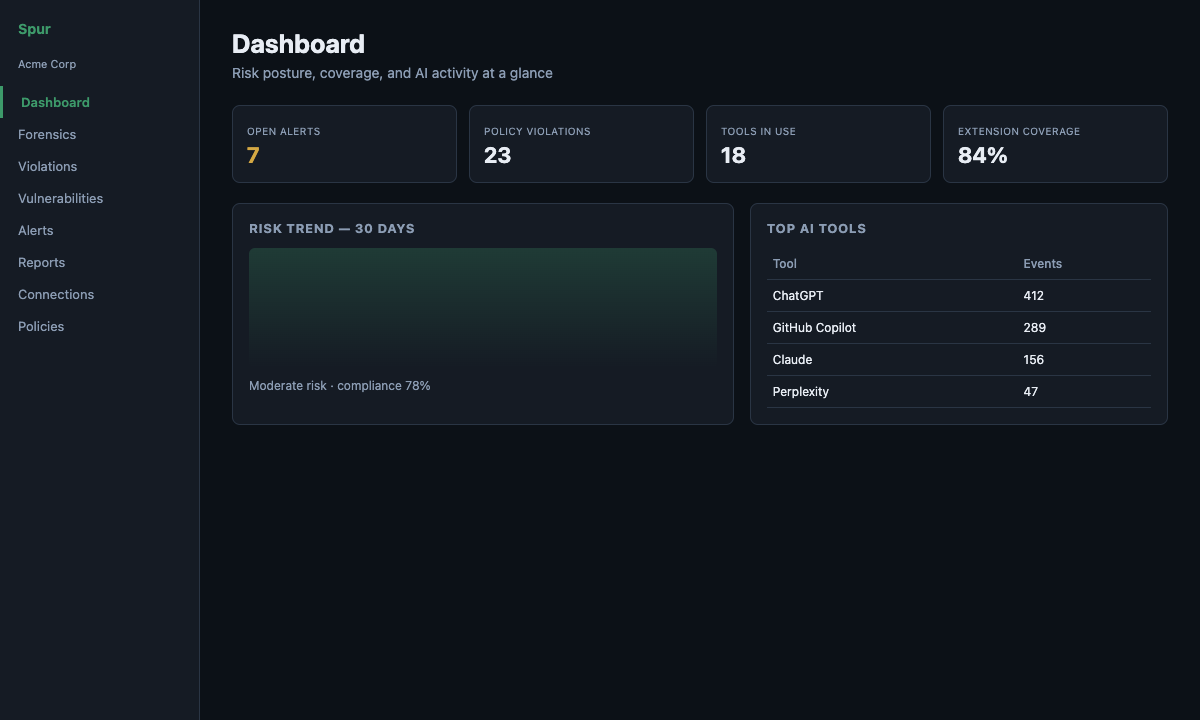
See AI tools in use across your estate

See which AI tools are in use, who is using them, and where you have gaps. The dashboard is your starting point for risk, alerts, and coverage.

  • At-a-glance posture and open alert counts
  • Approved vs shadow tool visibility
  • Device and user enrolment status
  • Registry of known AI services and risk bands
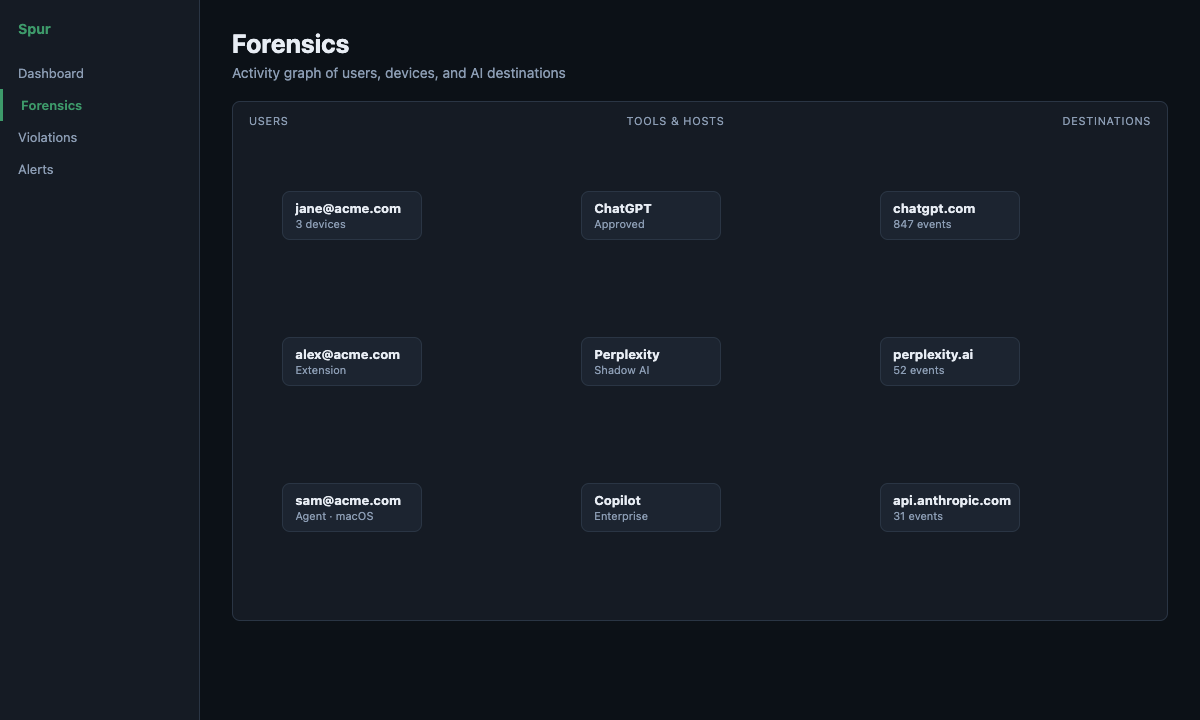
Spur AIDR dashboard with risk posture and AI tool activity
Response · Forensics

Investigate who connected to what

Usage context in the Forensics graph — users, devices, and AI destinations over time. Filter, search, and export SVG, PNG, or CSV for incident response.

  • Interactive user · tool · destination graph
  • Time-window controls and edge filtering
  • Export to SVG, PNG, or CSV
  • Drill-down from any node
Spur AIDR Forensics activity graph
Runtime · Policies

Enforce where work happens

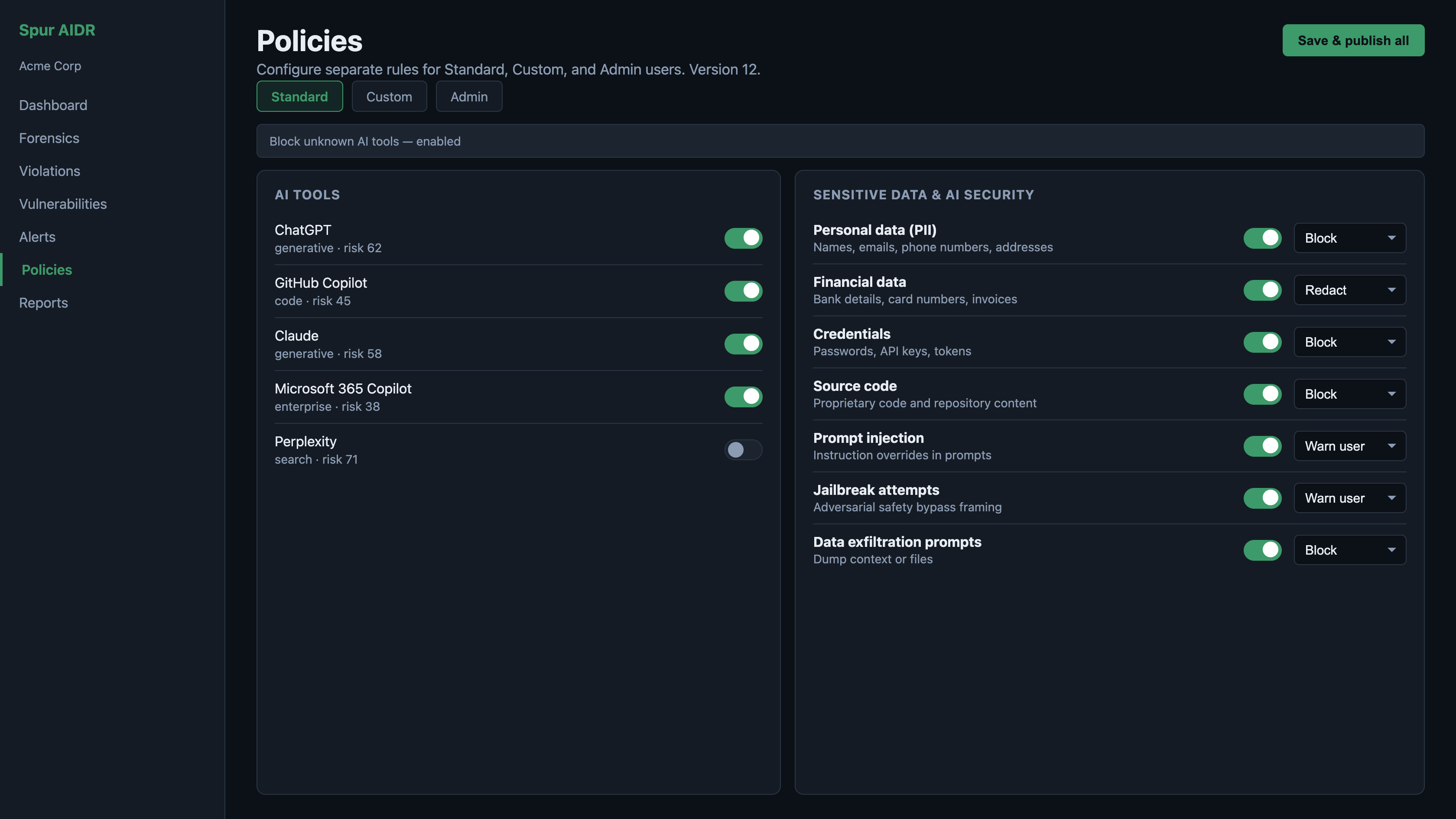
Policies turn your rules into action at the point of use — before sensitive content leaves the device. Violations flow into alerts and posture so patterns do not get lost in a spreadsheet.

  • Block, redact, warn, or log per your rules
  • Tool allowlists and tiered controls
  • Alert queue for security triage
  • Posture findings with remediation guidance
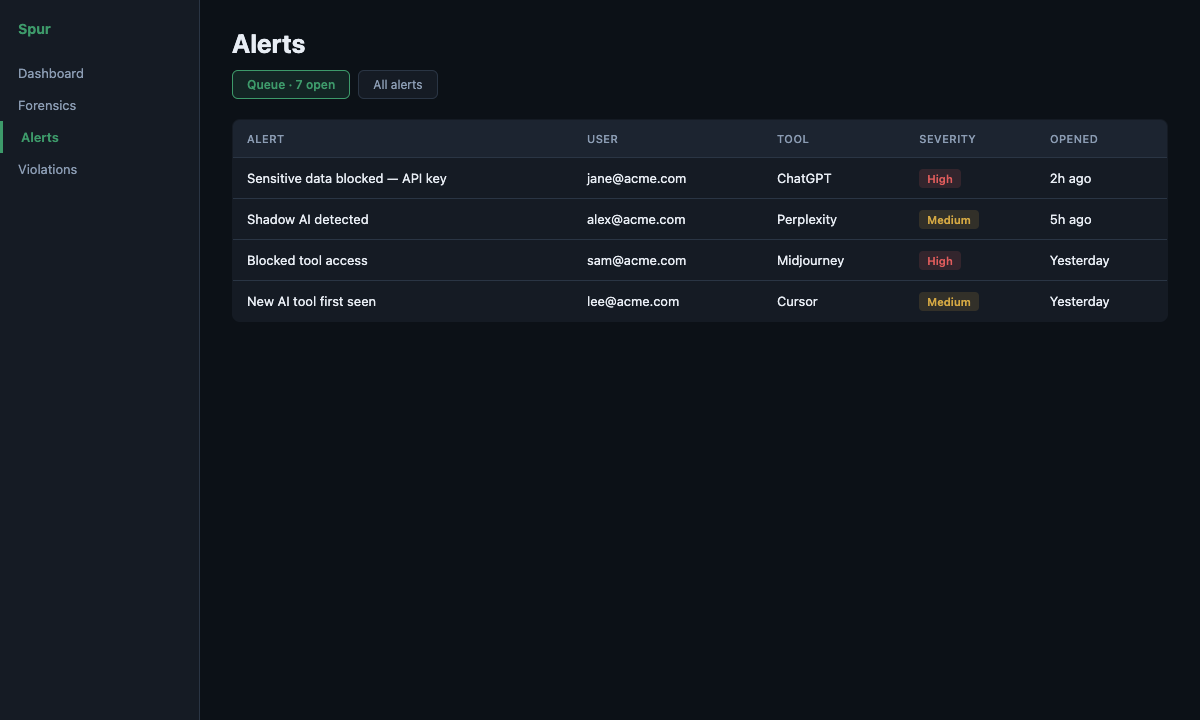
Spur AIDR alert queue for open incidents
Response · Alerts & Reports

Triage alerts. Prove posture.

The alert queue is your response inbox. Reports and audit exports help compliance teams show progress — without exporting what employees typed into AI tools.

  • Alert queue — unresolved alerts, oldest first
  • Executive report with compliance framework scores
  • Audit CSV export (ISO 27001, SOC 2, NIST, CIS, Cyber Essentials mapping)
  • Print/PDF executive report for board and audit conversations
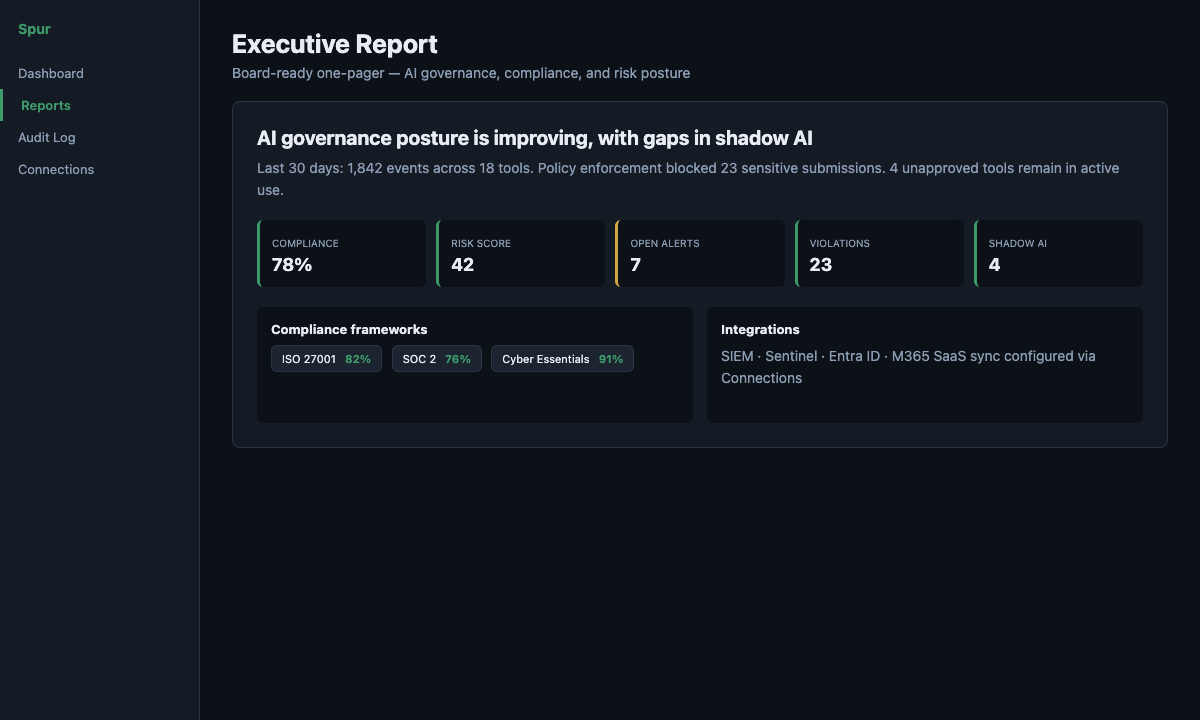
Spur AIDR executive report with compliance posture
Posture · Vulnerabilities

Prioritise AI security findings

Findings inferred from real usage — shadow tools, policy gaps, and data exposure — with severity, OWASP LLM tags, and accept or remediate workflow. Threat intel enriches events on ingest.

  • Open findings ranked by severity and evidence
  • OWASP LLM and MITRE-mapped context
  • Disposition workflow — open, accepted, remediated
  • Feeds the executive report and dashboard posture
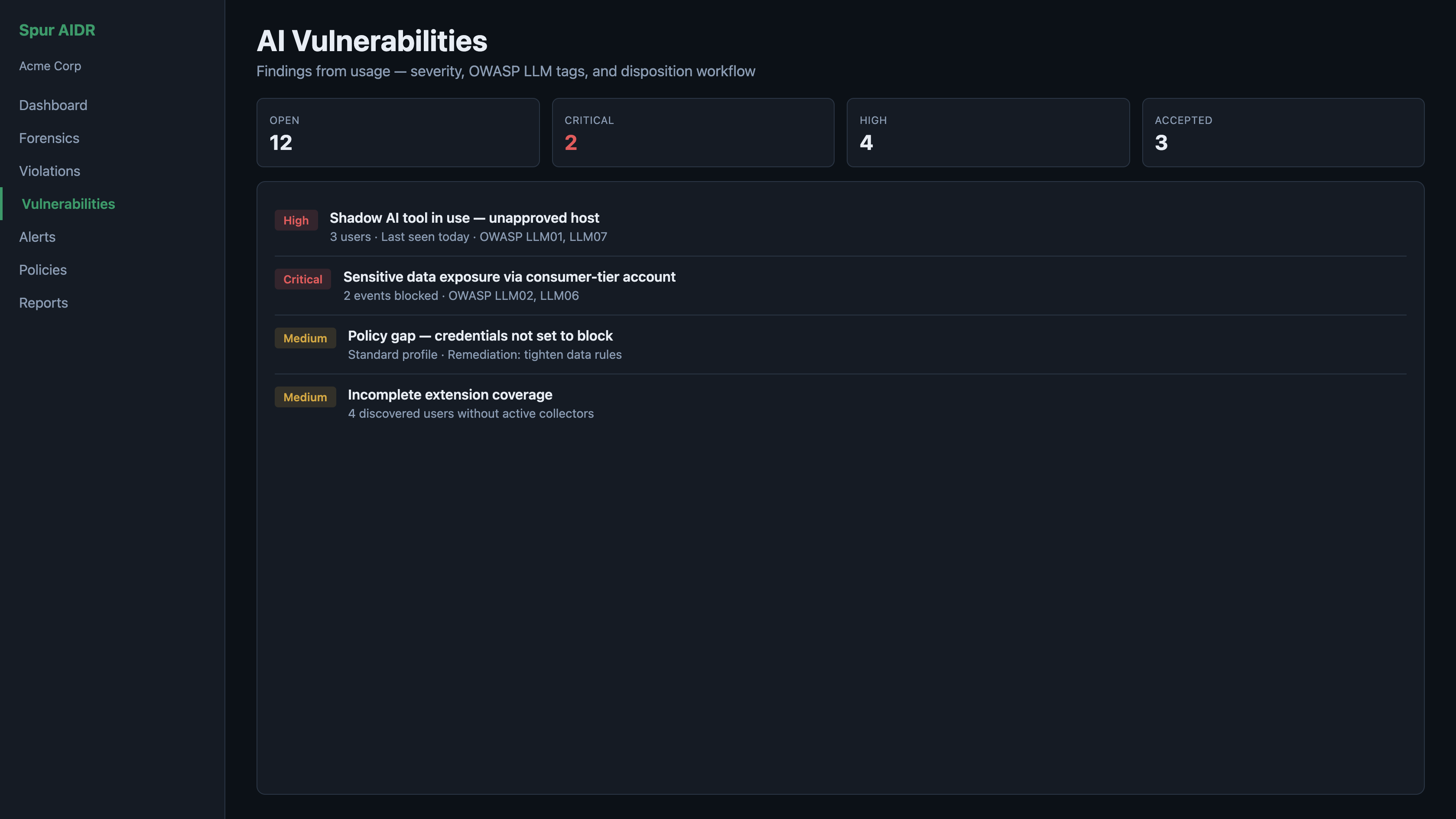
Spur AIDR AI vulnerabilities and posture findings

Simple pricing, no surprises

Spur AIDR is in early access. Join the list for release updates and pilot availability.

Spur AIDR
Free
Early access · Join the release list
  • Browser extension + macOS endpoint agent
  • Runtime policy enforcement at the keyboard
  • Alerts, Forensics, and AI vulnerability posture
  • Executive reports and audit export
  • Threat intel enrichment (OWASP, MITRE, phishing/CVE feeds)

Runtime enforcement.
Intel-backed detection.
One closed loop.

Spur AIDR connects discovery, enforcement, investigation, and reporting in one workflow — for teams that need AI coverage, not another log dump.
Spur AIDR · Early Access

AI Detection & Response
where employees actually use AI

Detect threats, enforce policy at the keyboard, respond in the portal, and report with evidence — without replacing your EDR or CASB.

What Spur AIDR delivers

Extension and endpoint sensor at the keyboard; intel-backed detection and response in the portal.

Detection

Detecting AI threats and vulnerabilities

See approved and shadow AI across your estate. On-device classifiers catch prompt injection, jailbreak, data exfil, and sensitive data — enriched with OWASP LLM, MITRE, and synced threat intel on ingest.

  • Dashboard posture — tools, users, open alerts, coverage gaps
  • AI vulnerabilities from real usage — severity, evidence, accept or remediate
  • Unknown tools, phishing-shaped hosts, and consumer-account signals
  • Metadata to the portal — not full prompt capture by default
Spur AIDR dashboard — AI risk posture and activity
Response

Responding to AI threats

Turn detections into action. The alert queue is your triage inbox; Forensics connects users, devices, and AI destinations when you need to investigate.

  • Alert queue — blocked tools, policy hits, injection, unknown AI
  • MITRE- and OWASP-mapped context on events
  • Forensics graph — filter, drill-down, export SVG/PNG/CSV
  • Violations stream and disposition workflow
Spur AIDR Alert Centre — triage queue for open incidents
Enforcement

Policy enforcement

Your rules run where employees work — browser extension and endpoint sensor — before sensitive content reaches the model. The portal is where you define tiers, data rules, and who they apply to.

  • Block, redact, warn, or log per policy
  • Tool allowlists, tiers, and block-unknown-tools
  • Custom patterns plus built-in sensitive-data classifiers
  • Assign policies by portal user or extension email
Spur AIDR policies — tool tiers, data rules, and enforcement actions
Compliance

Reporting and compliance

Prove posture to auditors and leadership. Executive reports map activity to common frameworks; audit export gives CSV evidence — without exporting what employees typed into AI tools.

  • Executive report — ISO 27001, SOC 2, NIST, CIS, Cyber Essentials
  • Audit log CSV export for incident and compliance review
  • Print/PDF board report — no prompt content exported
  • Complements EDR, CASB, and cloud DLP — adds the employee-AI layer
Spur AIDR executive compliance report

Four layers. One job: secure employee AI.

Deploy, detect with intel, enforce at use, respond in the portal.

View ecosystem diagram · Threat landscape →

Runtime enforcement.
Intel-backed detection.
One closed loop.

Join the release list for Spur AIDR early access and pilot availability.

Why we built
Lapwing

Organisations need AI Detection & Response — not another dashboard that only logs shadow IT. Spur AIDR connects discovery, enforcement, posture, and investigation for growing security teams.

Shadow AI is the new shadow IT

A decade ago, employees started using Dropbox, Slack, and Google Docs without IT approval. Security teams scrambled to catch up. The same pattern is repeating — only this time the stakes are higher.

Growing companies face the same compliance obligations as a Fortune 500 firm, but without the security team, the budget, or the enterprise tooling to match. That's the gap Lapwing was built to fill.

Simple to deploy. Clear to understand. Immediately actionable.

Our name

The lapwing is a British bird known for one thing above all others: it will aggressively dive on anything that threatens its territory. It sees what others miss and acts before harm is done. That's the instinct we've built into our product.

Who it’s for

Teams that need runtime AI governance — visibility, policy control, and audit-ready reporting.

What we stand for

Visibility first

You can't protect what you can't see. We give IT teams the full picture before asking them to act on it.

Privacy by design

We never store prompt content by default. Enforcement runs where employees work; the portal sees metadata and policy outcomes, not what they typed. We protect your data the same way we help you protect your customers'.

Built for humans

No jargon. No 40-page manuals. If a non-security IT manager can't understand it in five minutes, we haven't done our job.

Help build Spur AIDR

We're building Spur AIDR in the open with a small core team. If you're a developer who cares about security, privacy, and practical tooling, we'd love to hear from you.

Useful skills include TypeScript, browser extensions (MV3), macOS endpoint work, API design, and security-minded product engineering. You don't need enterprise security experience — curiosity and good judgment matter more.

What you might work on

  • Browser extension — discovery and policy enforcement
  • macOS endpoint agent — coverage and enforcement
  • Control plane API and admin portal (React)
  • On-device classification, posture views, Forensics graph

Donate

Lapwing is an independent UK company building security tooling without enterprise budgets. Donations help us keep development moving while Spur AIDR is in early access.

Thank you for supporting independent security software.

Want to know more?

Join the release list for product updates, or get in touch if you want to help build Spur AIDR.

Get Spur AIDR release updates

Leave your details and we’ll email you when Spur AIDR opens wider availability, plus major product updates. No spam.

Stay informed

We’ll only email product updates and release availability.

What you’ll get

Release timing

A short email when Spur AIDR opens wider availability.

Major product updates

New tool coverage, policy controls, and deployment improvements.

Privacy-first

Spur AIDR is designed to avoid collecting prompt content by default.

UK-based

Lapwing Ltd · lapwingdefence.com · Registered in England & Wales

Simple, transparent pricing

Spur AIDR is not generally available yet. Join the release list for updates when wider access opens.

Spur AIDR
Free
Early access · Join the release list
  • Browser extension + macOS endpoint agent
  • Runtime policy enforcement at the keyboard
  • Alerts, Forensics, and AI vulnerability posture
  • Executive reports and audit export
  • Threat intel enrichment (OWASP, MITRE, phishing/CVE feeds)

Common questions

Is Spur AIDR available today?

Not yet for general availability. Join the release list and we’ll email you when wider access opens.

How is Spur AIDR deployed?

Deploy the Chrome, Edge, or Firefox extension via enterprise policy or sideload. The macOS endpoint agent ships as a .pkg today (Windows agent on the roadmap). Employees enrol with a shared org code.

Do you read or store our prompts?

No. Enforcement runs at the point of use; the portal receives metadata and policy outcomes. We do not store prompt or document content by default.

Is Spur AIDR replacing our EDR?

No. EDR protects endpoints from malware and compromise. Spur AIDR covers employee use of third-party AI — browser and desktop — with metadata in your portal. Keep your existing stack; add the AI layer.

What is AI posture in Spur AIDR?

Findings inferred from your usage — shadow tools, policy gaps, and recurring risk — with severity, evidence, and accept/remediate workflow. This reflects how employees use third-party AI today; it is not a substitute for testing your own LLM application.

Does runtime enforcement actually work?

Yes. Policies can block disallowed tools and apply your chosen actions when risk is detected — in the browser and on supported endpoints. Exact behaviour depends on your deployment and policy configuration.

What’s next?

SIEM and directory integrations, broader agent platforms, and deeper enterprise deployment options. Join the release list for updates.

Get notified when Spur AIDR launches.

Join the release list for product updates and availability announcements.